
Features of Sportzfy App
Sportzfy App brings daily sports events, channels and viewing controls into one Android app. Find a live match, check what’s coming next or adjust the player to suit your connection. Here’s a closer look at the features you can use while watching.
Find the Match Without Checking Every Channel
Sportzfy gives you two ways to browse: open an event from the daily listings or choose a channel and follow its coverage. The filters help keep live, upcoming and earlier events separate.
Daily Sports Events
The Home section brings listed cricket, football and other sports events together. You can see what’s on without opening each channel separately. When a match has an active link, select it to start watching.
All, Live, Upcoming and Recent
Use Live to find events in progress or Upcoming to check what’s scheduled next. Recent keeps earlier listings separate, while All brings the event list together.
Sports and Regional Channels
Browse available sports channels or explore groups for Bangladeshi, Pakistani, Indian and Nepali channels. Channel browsing is useful when you want coverage beyond a single match, including discussions and sports programmes.
An Upcoming listing does not mean its stream is active yet. Match links, channel selections and coverage can change, so check again closer to the event’s start time.
More Control Inside the Sportzfy Player
You can open available streams directly inside the app. The built-in player keeps viewing settings close at hand, so you can make changes without moving to a separate player.
Built-In Video Player
Watch matches and channels within Sportzfy without installing another video player. Open a stream and use its available playback controls from the same screen.
Video Quality Selection
Choose from the video quality levels supplied by the stream. A lower setting can help when your connection struggles, while a higher setting may offer a clearer picture when enough bandwidth is available.
Multiple Audio Tracks
Where a stream includes more than one audio track, you can choose your preferred option. This may include different commentary languages, though the choices vary between events.
Player Lock
Lock the player controls to help prevent accidental touches from interrupting your match. Unlock them whenever you want to change a setting or leave the stream.
Automatic Server Switching
If the current streaming link fails, automatic server switching tries another available server. This can reduce manual switching, but it still needs a working alternative link and an active connection.
Force Low Quality
Use Force Low Quality when your internet struggles with higher-quality video. It favours lower-quality playback and may reduce buffering, but it cannot fix a broken stream or a connection that keeps dropping.
Follow Up to Four Events Together
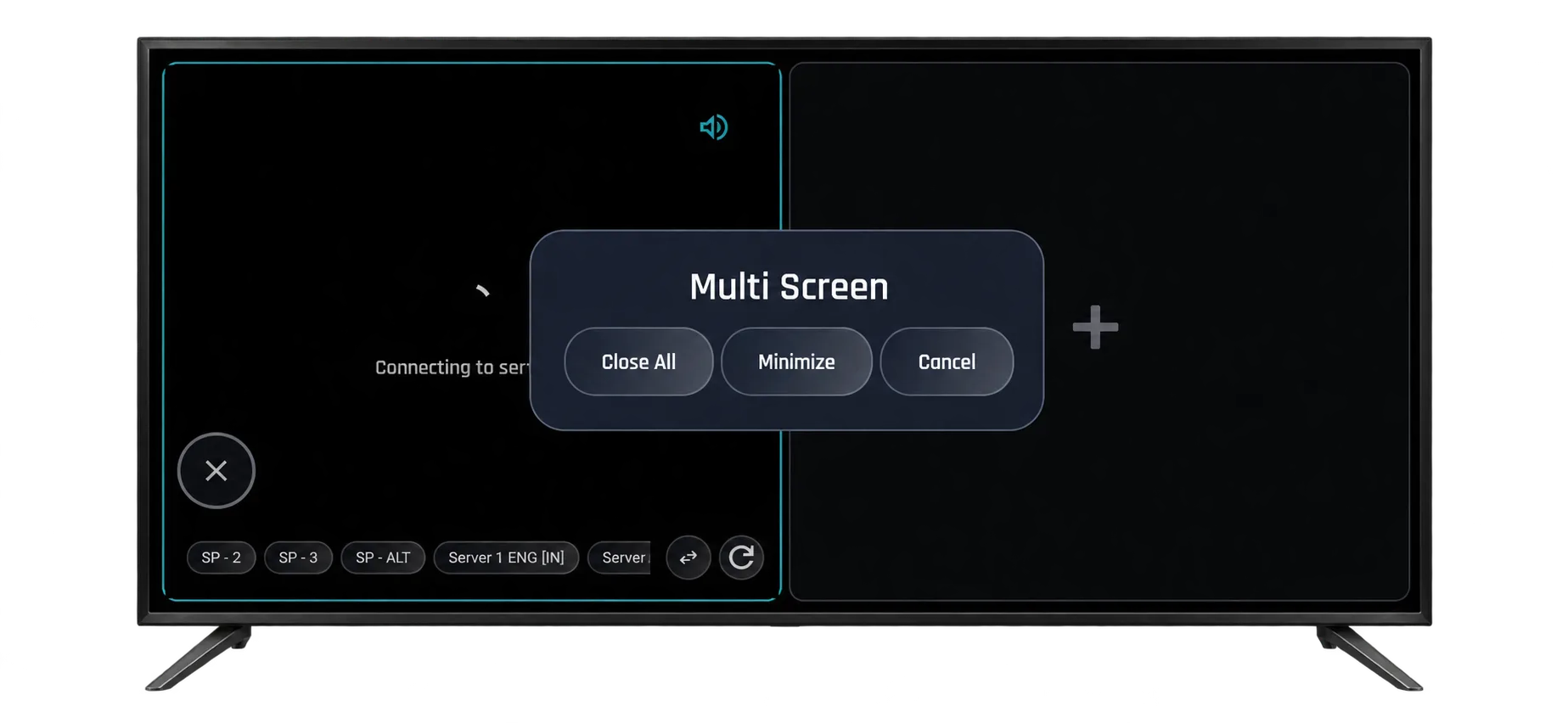
When matches overlap, Multi Player lets you keep up to four events on one screen. You can follow a cricket match while keeping an eye on football or another game.
Each stream uses connection bandwidth and device resources. If playback struggles, try fewer events or lower the video quality. A larger display gives each stream more viewing space.
Floating Player
Keep a match visible in a small floating window while you use other apps. Reply to a message or check something in your browser without completely leaving the game. Availability can depend on your device and its permissions.
TV Mode
TV Mode offers a layout suited to larger displays. It is available on mobile too, while compatible TV devices let you browse using a remote. The same Sportzfy APK is used on supported phones and TV devices.
Other Ways to Open Streams and Catch Up
The app also includes options for opening a stream directly, browsing grouped entries and watching available highlights after a match.
Network Stream
Enter a compatible streaming URL in Network Stream to open it in Sportzfy’s player. Playback depends on whether the link is supported and still working.
Playlist
Browse grouped channels and streams through an available playlist. Related entries stay together, giving you another way to find a stream without opening each link separately.
Match Highlights
Catch available goals, wickets and other key moments from games you missed. Highlights offer a shorter way to follow the action, but they may not be added for every event.
Limited App Advertising
Sportzfy shows one app ad per 12-hour period. This limits how often the app’s own advertising appears during regular use.
Advertising included in a broadcaster’s stream is separate from Sportzfy’s own app ads.
Use Sportzfy on a Bigger Screen
Choose a setup that suits your device. Supported TV devices can install the Android APK directly, while computers need a compatible Android emulator.
Android TV and FireStick
Use TV Mode and remote navigation on a compatible Android TV, Google TV or Android-based FireStick. Check your device’s operating system before installing.
Sportzfy for TV GuideWindows PC and Mac
Run the Android APK through a compatible emulator. Sportzfy has no native Windows or Mac app, so emulator and hardware support matter.
Install Sportzfy on PCWhat Changed in Sportzfy v32?
Sportzfy v32, released on 27 August 2026, introduced Multi Player, TV Mode and fixes for bugs from previous releases.
The glass-style interface arrived in an earlier update. If you’re returning from an older version, the design and added player options may look different from what you last used.
Before updating, check the available version and follow the steps for your device in our Sportzfy installation guide.
What Affects Your Viewing Experience?
Player features give you more choice, but smooth playback also depends on the stream, your connection and your device.
- Stream availability: A listed channel or match may not have a working link at every moment.
- Internet connection: Higher video quality and multiple streams need more bandwidth.
- Device performance: Older or lower-powered devices may struggle with several events at once.
- Source options: Video quality and commentary languages depend on what the stream provides.
If a stream buffers, try another available link, lower the video quality or reduce the number of events in Multi Player. Changing a setting will not restore a stream that is unavailable.
Frequently Asked Questions
Does Sportzfy need a separate video player?
No. Sportzfy includes a built-in player for watching available matches and channels inside the app.
How many events can I watch with Multi Player?
You can follow up to four events together. Your device and internet connection need to handle the extra streams.
Does every match have multiple commentary languages?
No. Multiple Audio Tracks are available only when the selected stream supplies them. Some streams include a single track.
Is TV Mode only available on a television?
No. TV Mode is also available on mobile. On compatible TV devices, the larger screen and remote navigation suit viewing from a distance.
Does Force Low Quality stop all buffering?
No. It may help when higher-quality playback needs more bandwidth than your connection can provide. It cannot repair an unavailable link or an unstable connection.
Are highlights available for every match?
No. The selection depends on which highlights have been added. Check the app for what is currently available.
How often does Sportzfy show app ads?
Sportzfy shows one app ad per 12-hour period. Ads included within a channel’s broadcast are separate.
Are these features available on iPhone or iPad?
Sportzfy has no iOS or iPadOS app. Its Android APK cannot be installed on an iPhone or iPad.
Try the Sportzfy App
Download the APK to explore daily events, channels and player settings on your compatible Android device. Check the app requirements and follow the installation steps before getting started.
Download Sportzfy APK